
Firecrawl Review 2026: Pricing, Features & Verdict

Getting clean, structured data out of modern websites is harder than it sounds. JavaScript-rendered pages, bot detection systems, dynamic content loading, and inconsistent HTML structures mean that a simple HTTP request returns almost nothing useful. Most developers either build brittle scrapers that break constantly or pay for overengineered solutions that require weeks of setup.
Firecrawl takes a different approach. It is an open-source web scraping and crawling API built specifically for AI applications — one that converts any URL into clean, LLM-ready markdown in a single API call. Used by over 80,000 companies including Apple, Canva, and Shopify, it is built by the team at Mendable and has grown to become one of the most widely adopted tools in the AI developer stack.
This Firecrawl review covers every aspect of the platform: what it actually does, how each API endpoint works, the full pricing breakdown, and an honest comparison against Apify. If you are evaluating Firecrawl as the web data layer for an AI agent or RAG pipeline, this is the guide you need.
Quick Verdict
Rating: 4.6 / 5
Pros:
- Clean LLM-ready markdown output with no post-processing required
- Handles JavaScript rendering, CAPTCHA, and anti-bot bypass automatically
- Six purpose-built API endpoints covering every web data use case
- Official MCP Server integrates directly with Claude, Cursor, and Windsurf
- Open-source with 122K+ GitHub stars — self-host if needed
- SDKs for Python, Node.js, Go, Rust, Java, and Elixir
- Generous free tier: 1,000 credits per month at no cost
Cons:
- Credits do not roll over month to month (except on Scale/Enterprise annual plans)
- No pay-per-use plan — you commit to a monthly subscription
- Interact endpoint (browser minute billing) can get expensive for long multi-step sessions
- Self-hosted version lacks the proprietary Fire-engine infrastructure and Interact features
What Is Firecrawl?
Firecrawl is an open-source web scraping and crawling API that converts any URL into structured, LLM-ready data. Pass it a URL and it returns clean markdown, raw HTML, screenshots, structured JSON, or page metadata — whichever format your application needs. The entire process of handling proxies, JavaScript rendering, bot detection, and content normalization happens on Firecrawl's infrastructure, not yours.
It is built by Mendable, a Y Combinator-backed company focused on AI developer tooling. Firecrawl started as an internal tool for powering Mendable's own AI products and was later open-sourced when it became clear the problem was universal. The GitHub repository has crossed 122,000 stars, making it the most widely starred open-source scraping project in the space.
What separates Firecrawl from general-purpose scrapers is that it is designed specifically for the AI use case. The output is optimized for LLM context windows: clean markdown with boilerplate removed, consistent structure, and full-page content that a model can actually reason over. There is no need to parse HTML or filter irrelevant content before feeding it to an AI system.
The hosted version runs on Fire-engine, Firecrawl's proprietary infrastructure layer that handles proxy rotation, browser rendering, and anti-bot bypass at scale. The open-source version is available for self-hosting but does not include Fire-engine — making the hosted API the practical choice for production workloads.
Core API Endpoints
Firecrawl is organized around six distinct endpoints, each solving a specific step in the web data pipeline. Credits are consumed per use.
| Endpoint | What It Does | Credit Cost |
|---|---|---|
| Search | Search the web and get full page content from results | 2 credits / 10 results |
| Scrape | Extract content from a single URL as markdown, HTML, JSON, or screenshot | 1 credit / page |
| Crawl | Recursively follow links and scrape entire sites or sections | 1 credit / page |
| Map | Discover all URLs on a website without scraping content | 1 credit / page |
| Interact | Operate a browser session — click, fill forms, navigate multi-step flows | 2 credits / browser minute |
| Extract | Pull structured JSON from pages using a schema you define | Dynamic pricing |
Search
The Search endpoint lets you query the web and get back full page content in a single call — not just links and snippets. It handles the search and the scrape in one operation. You send a query string, get back a list of matching pages, and each result includes the complete markdown content ready for use. This is the fastest way to power a research agent that starts with a question rather than a specific URL. If you need dedicated SERP data at higher volume, our best SERP scraping API providers guide covers the alternatives.
Scrape
Scrape is the most used endpoint. Give it any URL and it returns the page in whatever format you specify: clean markdown, HTML, structured JSON via a schema, a screenshot, or page metadata. JavaScript rendering is automatic. You do not configure a headless browser or manage rendering timeouts — Firecrawl handles it. One call, one page, clean output.
Crawl
Crawl extends Scrape across an entire website or section of a site. You provide a starting URL and configuration parameters — depth limit, page limit, URL path filters, and whether to respect robots.txt — and Firecrawl follows links recursively, scraping every reachable page. This is what you use when building a knowledge base, training dataset, or comprehensive competitive analysis across a domain.
Map
Map returns all discoverable URLs on a website without scraping the actual page content. It is useful for site audits, planning a crawl before executing it, or finding specific pages on large domains when you do not know the exact URL. It runs significantly faster than Crawl because it does not fetch or render page content.
Interact
Interact is the most powerful and complex endpoint. It lets you operate a live browser session using plain English prompts or code. After an initial scrape establishes a session, you can issue follow-up actions: click a button, fill a form, scroll to a section, authenticate, navigate to the next page. This is how you extract data that sits behind a login wall, paginated interface, or multi-step checkout flow that a static scrape cannot reach.
Extract
Extract accepts a JSON schema and returns structured data matching that exact shape from any page. You define the fields you want — product name, price, availability, description — and Firecrawl returns structured JSON without any post-processing. This is particularly useful for price monitoring, product catalog scraping, and lead enrichment pipelines.
Firecrawl Features: A Closer Look
LLM-Optimized Markdown Output
Firecrawl's default output format is clean markdown, specifically optimized for LLM context windows. It removes navigation menus, cookie banners, footers, advertisements, and other boilerplate that inflates token usage without adding informational value. What remains is the actual content of the page — headings, paragraphs, tables, lists — in a consistent structure that language models can process efficiently.
This matters more than it sounds. If you are building a RAG pipeline and feeding raw HTML into an embedding model, you are wasting a significant portion of your token budget on noise. Firecrawl's markdown output reduces token consumption while improving the quality of retrieved context.
JavaScript Rendering
Firecrawl renders JavaScript automatically for every request. Single-page applications, React/Next.js sites, and dynamically loaded content are handled without any extra configuration. The API uses smart wait logic — it intelligently detects when the page has finished loading rather than applying a fixed timeout, which makes extraction faster and more reliable on sites with variable load times.
Anti-Bot Bypass and CAPTCHA Handling
Firecrawl's hosted infrastructure handles proxy rotation, browser fingerprinting, and CAPTCHA solving automatically. The proprietary Fire-engine layer is built specifically to cover the 96% of the web that basic HTTP clients and standard headless browsers fail on. You do not configure this — it is part of every request to the hosted API.
Structured JSON Extraction with Schemas
Pass a JSON schema to the Scrape or Extract endpoint and Firecrawl maps the page content to your defined structure. This replaces the entire pipeline of "scrape → parse → transform" with a single API call that returns exactly the shape of data your application expects. Schema-based extraction works across product pages, directory listings, pricing tables, and most other structured content types.
MCP Server Integration
Firecrawl has an official Model Context Protocol (MCP) Server that connects it directly to any MCP-compatible AI tool. This includes Claude, Cursor, Windsurf, and VS Code with the Continue extension. Once installed, your AI agent can search, scrape, and interact with the web as a native capability — without any custom tool code. The MCP server has been installed over 400,000 times.
Installation is a single command: npx -y firecrawl-cli@latest init --all --browser. After restarting your agent, Firecrawl's web data capabilities are immediately available.
Open-Source and Self-Hostable
Firecrawl's core codebase is fully open-source under the AGPL license, with 122,000+ GitHub stars. You can run the entire stack on your own infrastructure if data privacy, cost at extreme scale, or compliance requirements make the hosted version impractical. The main tradeoff is that the self-hosted version does not include Fire-engine — the proprietary infrastructure that handles proxy management, advanced rendering, and bot bypass. The open-source version works well for accessible sites but will have lower success rates on heavily protected targets compared to the hosted API.
Document Parsing
Beyond HTML pages, Firecrawl can parse PDFs and DOCX files directly from URLs. Pass a link to a PDF report or a Word document and get back structured markdown content. This is useful for research pipelines that need to process a mix of web pages and document files in a single workflow.
Pricing
Firecrawl pricing is credit-based. Each API request consumes credits according to the endpoint used. Annual billing saves two months compared to monthly, and plans can be upgraded or downgraded at any time.
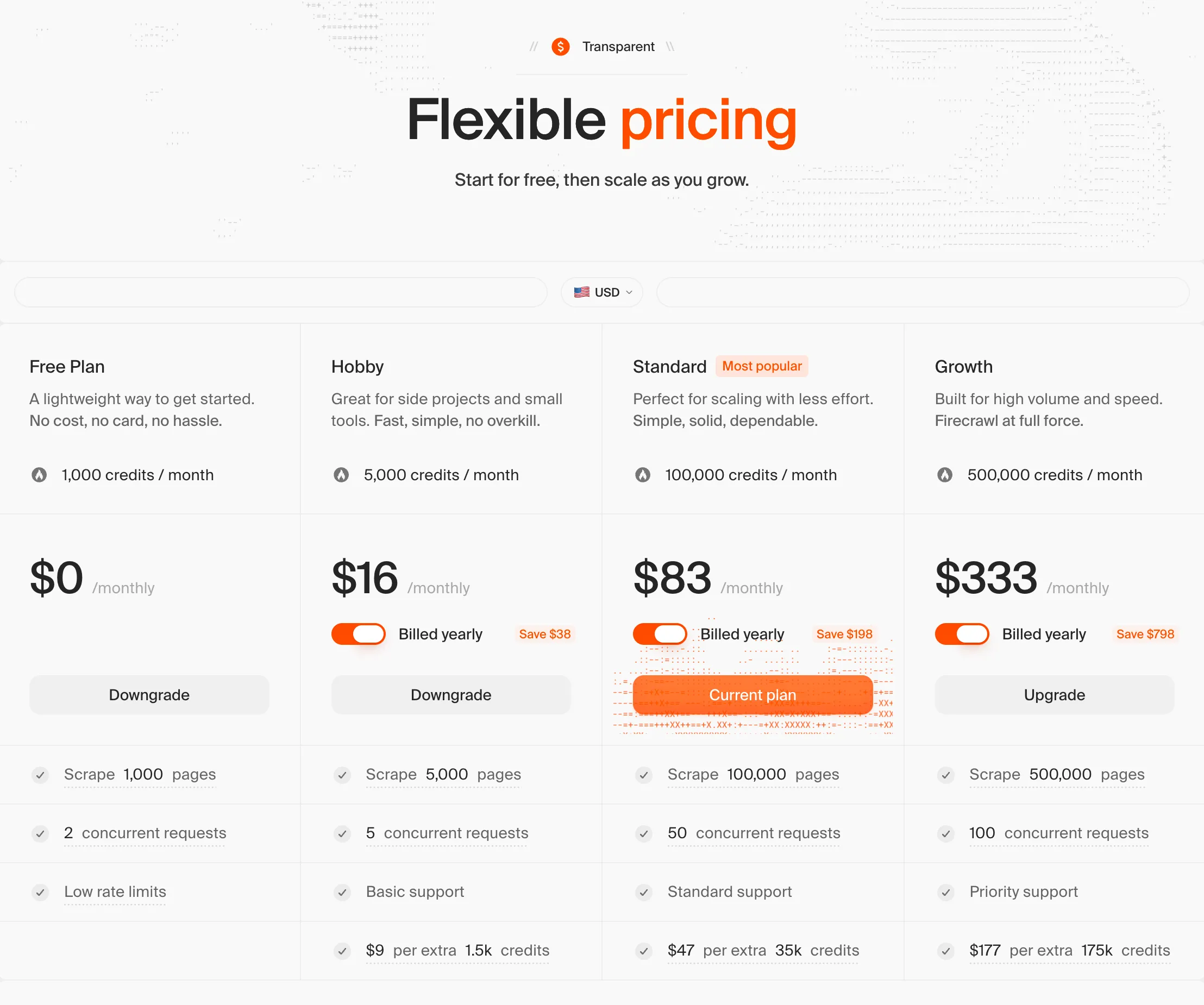
| Plan | Monthly Price (Annual) | Credits / Month | Concurrent Requests | Support |
|---|---|---|---|---|
| Free | $0 | 1,000 | 2 | — |
| Hobby | $16 | 5,000 | 5 | Basic |
| Standard | $83 | 100,000 | 50 | Standard |
| Growth | $333 | 500,000 | 100 | Priority |
| Scale | $599 | 1,000,000 | 150 | Priority |
| Enterprise | Custom | Custom | Custom | Dedicated + SLA |
Annual plans include 2 months free (equivalent to saving $38 on Hobby, $198 on Standard, $798 on Growth, and $1,798 on Scale compared to month-to-month billing).
Extra credits are available via auto-recharge packs for all paid plans. Auto-recharge credits do roll over to the following month, which is an exception to the standard no-rollover policy.
Credit consumption by endpoint:
| Endpoint | Cost |
|---|---|
| Scrape | 1 credit / page |
| Crawl | 1 credit / page |
| Map | 1 credit / page |
| Search | 2 credits / 10 results |
| Interact | 2 credits / browser minute |
| Agent (Preview) | 5 free daily runs, then dynamic pricing |
Enterprise plan adds zero-data retention, SSO, advanced security controls, bulk discounts, and a dedicated support SLA. Appropriate for companies with compliance requirements or data residency constraints.
Failed requests are not billed in most cases. The only exception is requests using the FIRE-1 agent — those are always billed regardless of outcome.
Payments are processed through Stripe and accept all major credit cards, debit cards, and PayPal.
Who Is Firecrawl For?
AI Developers Building Agents and RAG Pipelines
Firecrawl is purpose-built for this use case. If you are building an AI agent that needs to retrieve live web data — competitive research, real-time fact-checking, document processing — Firecrawl's clean markdown output and MCP Server integration make it the lowest-friction option. The credit model is predictable, the API is simple, and the output requires no transformation before sending to a language model.
SEO Teams Doing Competitive Research
The Crawl and Extract endpoints cover the full competitive intelligence workflow: crawl a competitor's site, extract pricing tables and product listings as structured JSON, monitor changes over time with scheduled crawls. The Search endpoint is useful for broad topic research without managing proxy lists or dealing with search engine bot detection.
Startups Needing Scalable Web Data Infrastructure
Small teams building data products can use Firecrawl to skip the entire scraping infrastructure problem. The hosted API handles proxy management, browser rendering, CAPTCHA solving, and retry logic. You write the application logic; Firecrawl handles web access. This trades a fixed monthly cost for a significant reduction in engineering overhead.
Teams That Want Open-Source Flexibility
The open-source version lets you inspect the code, contribute improvements, and self-host when needed. The GitHub repository is actively maintained with frequent releases. For teams in regulated industries where data cannot leave their own infrastructure, self-hosting is a real option — with the understanding that success rates will be lower on protected sites without Fire-engine.
Firecrawl vs Apify
Firecrawl and Apify both solve the web data problem but from very different angles. Here is how they compare on the dimensions that matter most for 2026 use cases.
| Feature | Firecrawl | Apify |
|---|---|---|
| Primary audience | AI developers, agent builders | General developers, non-technical users |
| Architecture | Single unified API | 1,500+ pre-built Actors (scrapers) |
| Setup complexity | Low — single API key, one call | Moderate — select Actor, configure parameters |
| AI/LLM optimization | Native (clean markdown output) | Requires post-processing in most cases |
| Open-source | Yes (AGPL, 122K+ GitHub stars) | No (closed-source platform) |
| Self-hosting | Yes | No |
| MCP Server | Yes (official, 400K+ installs) | No official MCP Server |
| JavaScript rendering | Automatic, built-in | Depends on Actor used |
| Pricing model | Credit-based per API call | Pay per compute unit (CPU/memory) |
| Free tier | 1,000 credits/month | $5/month free compute |
| Best for | AI agents, RAG, real-time data | Pre-built scrapers for specific sites |
| Coding required | Yes — API integration | Optional — some Actors have no-code UIs |
When to choose Firecrawl: You are building something that needs live web data as an input to an AI system. You want one API that handles any URL without worrying about which specific scraper is configured for which site. You value open-source transparency and want the option to self-host.
When to choose Apify: You need a pre-built, site-specific scraper for a well-known platform (LinkedIn, Amazon, Instagram) and do not want to write any code. Apify's 1,500+ Actors cover hundreds of popular sites with purpose-built extraction logic. For non-developers or teams without engineering resources, Apify's visual interface and template library lower the barrier considerably. See our Apify review for a full breakdown.
The two tools are not mutually exclusive. Teams that need Apify's pre-built Actors for specific platforms often use Firecrawl for general-purpose web data access elsewhere in the same pipeline.
FAQs
Is Firecrawl free?
Yes. The Free plan provides 1,000 credits per month with no credit card required. At 1 credit per page for Scrape and Crawl, that covers 1,000 pages of data extraction per month. It is sufficient for testing, small personal projects, and evaluating the API before committing to a paid plan.
What is Firecrawl used for?
Firecrawl is primarily used to supply live web data to AI systems. Common use cases include powering AI research agents, building RAG pipelines with up-to-date content, lead enrichment from company websites, competitive pricing intelligence, SEO audits, and automated content monitoring. Any application that needs to extract information from websites at scale is a candidate.
Is Firecrawl open source?
Yes. The Firecrawl codebase is fully open-source under the AGPL license and available at github.com/firecrawl/firecrawl. It has over 122,000 GitHub stars, making it the largest open-source web scraping repository by star count. The open-source version can be self-hosted, though it does not include the proprietary Fire-engine infrastructure that powers the hosted API's higher success rates on protected sites.
How many pages can I scrape for free?
The Free plan includes 1,000 credits per month. Scraping and crawling each cost 1 credit per page, so you can scrape up to 1,000 pages per month at no cost. Search costs 2 credits per 10 results, and Interact costs 2 credits per browser minute. Credits on the Free plan do not roll over to the following month.
Is Firecrawl worth it?
For AI developers and teams building agent or RAG pipelines, yes. The API removes the hardest parts of the web data problem — JavaScript rendering, anti-bot bypass, output normalization — and returns clean, LLM-ready content with a single call. The free tier is enough to evaluate it properly, and the paid plans are priced fairly relative to the engineering time they replace. The main friction points are no credit rollover and no pay-per-use option; if either is a dealbreaker, weigh those against the alternatives carefully.
Does Firecrawl handle JavaScript-rendered pages?
Yes. JavaScript rendering is automatic for every request — there is no configuration needed. Firecrawl uses a smart wait system that detects when a page has finished loading rather than applying a fixed timeout. This handles SPAs, React and Next.js applications, and dynamically loaded content reliably. The hosted API also handles anti-bot measures and CAPTCHA solving as part of the same request.
Is Firecrawl Worth It for AI Developers?
Firecrawl earns its 4.6/5 rating by solving a genuinely hard problem with minimal friction. The API design is clean, the output quality is high, and the MCP Server integration makes it trivially easy to wire into any AI agent workflow. For developers building AI applications that need live web data, it removes the most time-consuming part of the stack — getting reliable, clean content out of unpredictable websites.
The honest caveats: credits do not roll over, there is no pay-per-use option, and the Interact endpoint's per-minute billing can accumulate quickly for complex workflows. The free tier is generous enough for evaluation, but production workloads at any real scale start at $16/month and climb from there depending on volume.
For teams building AI agents, RAG systems, or competitive intelligence tools in 2026, Firecrawl is the most purpose-built option available. For users who need pre-built scrapers for specific platforms without writing code, Apify is the better fit.
Overall: 4.6 / 5