

How to Use the Cloro.dev ChatGPT Monitor API

If you want to know whether ChatGPT mentions your brand — or a competitor's — when someone asks it a relevant question, you need a way to query ChatGPT programmatically and capture the full response, including which sources it cited.
That is exactly what the Cloro.dev ChatGPT Monitor API does. You send a prompt, the API runs it through ChatGPT in a real browser environment, and it returns the full response: the text, the sources ChatGPT linked to, and even the sub-queries ChatGPT used internally to build the answer.
This guide walks you through the full workflow — from creating your account to running your first API call — and then covers how to use it in a real SEO or business context.
What Is the Cloro.dev ChatGPT Monitor API?
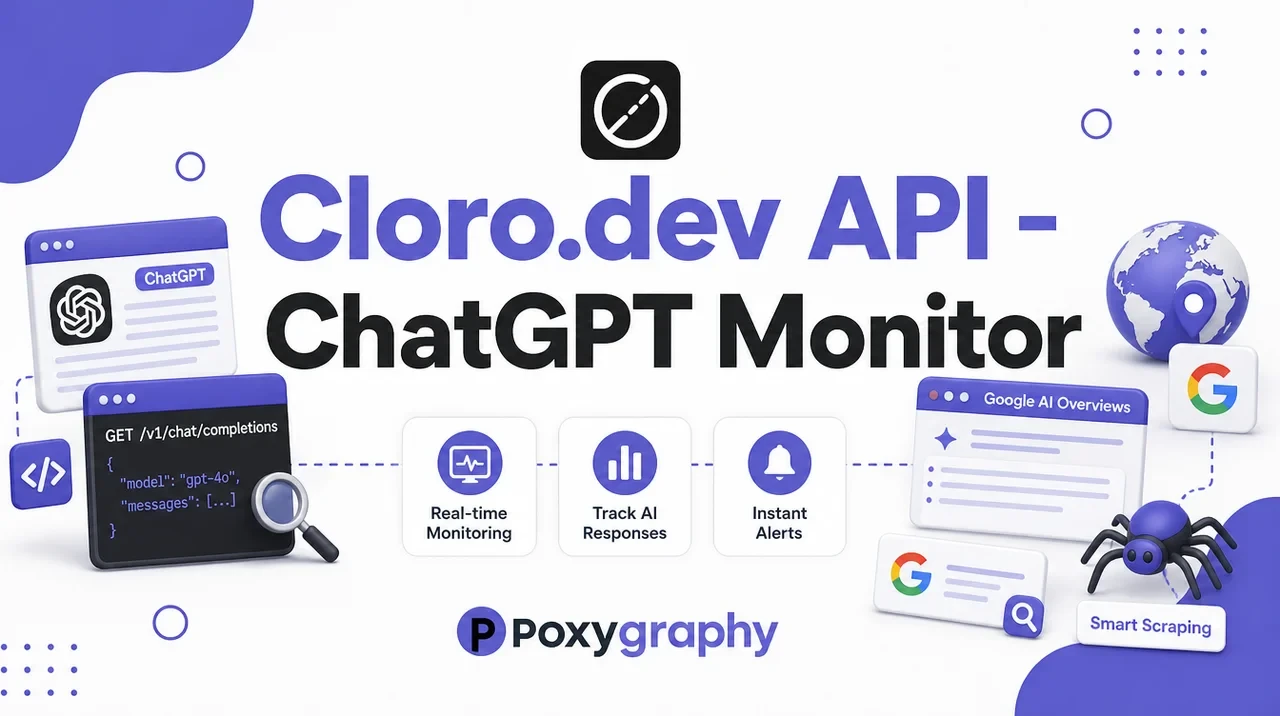
The Cloro ChatGPT Monitor API is a tool that lets you send prompts to ChatGPT and get back structured data about the response — not just the text, but also the sources ChatGPT cited, the search queries it expanded internally, and optionally the full HTML or raw response stream.
The key thing that makes this different from calling the OpenAI API directly: Cloro runs ChatGPT in a real browser environment, which means you get responses as an end user would actually see them — including citations and web search results that ChatGPT surfaces. The standard OpenAI API does not expose all of that.
The primary use is AI SEO monitoring. SEO professionals and businesses use it to track where their brand, products, or clients appear (or don't appear) in ChatGPT's answers for target queries.
What You Need Before Starting
Before you get to the first API call, make sure you have these:
- A Cloro.dev account (free to create — 500 credits included, no credit card needed)
- A basic understanding of API calls (if you know what a cURL command or
fetch()is, you're good) - A text editor or code environment to paste your API key safely
That's it. The API playground on the docs site lets you make your first call without writing a single line of code.
Step-by-Step: From Sign Up to First API Call
Sign Up for Cloro
Go to https://dashboard.cloro.dev/sign-up and create a free account. No credit card is required. You get 500 free credits to start, which is enough to run your first tests and understand the API before committing to a plan.
Choose a Plan
Once you're in, head to the pricing page. For most users starting out, the Hobby plan at $100/month covers a solid volume of daily monitoring requests. If you're just testing, use the free credits first — no need to purchase immediately.
Plans are based on request volume, so pick based on how many queries you plan to run per day or month.
Create Your First API Key
After logging in, you land in the dashboard. Look for the API Keys section — it is usually in the sidebar or settings area.
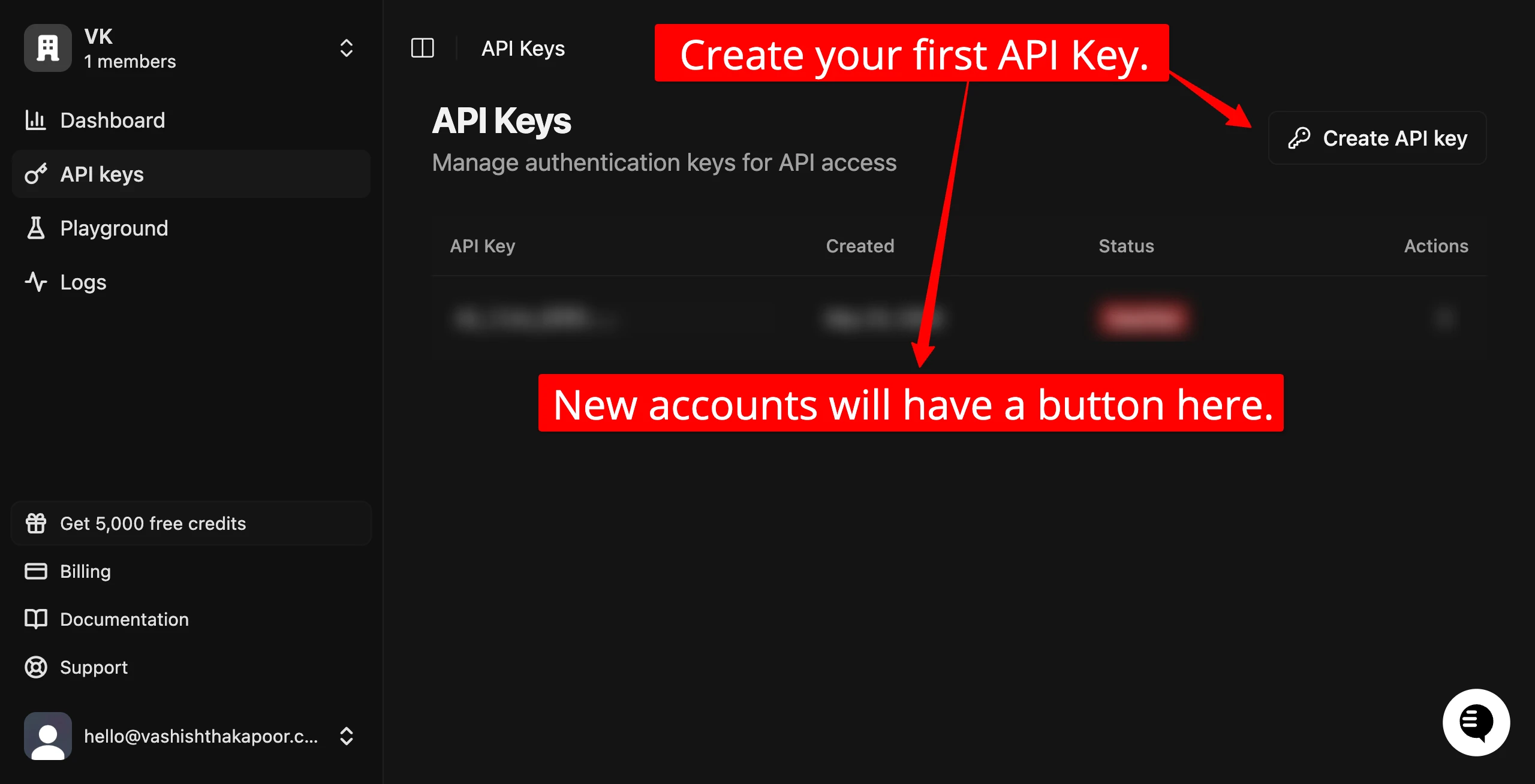
Click to create a new API key. Give it a name so you can identify it later (e.g., "test-key" or "seo-monitor"). Once created, copy it immediately — it will not be shown again in full. Store it somewhere safe like a password manager or a .env file.
Your API key is a secret. Do not paste it into public repos, Slack messages, or shared documents.
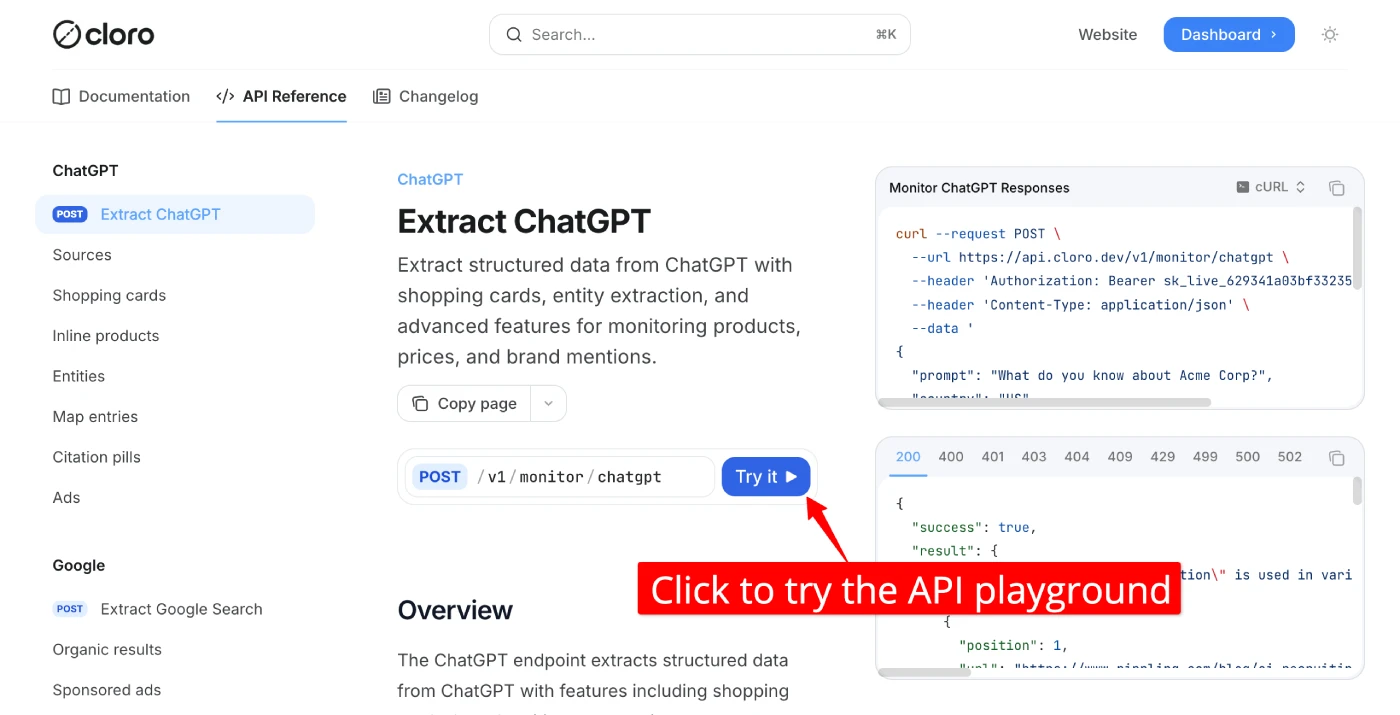
Open the API Playground
Open this URL in a new browser tab:
https://docs.cloro.dev/api-reference/endpoint/monitor-chatgpt?playground=open
This is the official Cloro API reference page with a built-in interactive playground. You can make a real API call directly from this page — no code required.
Authenticate in the Playground
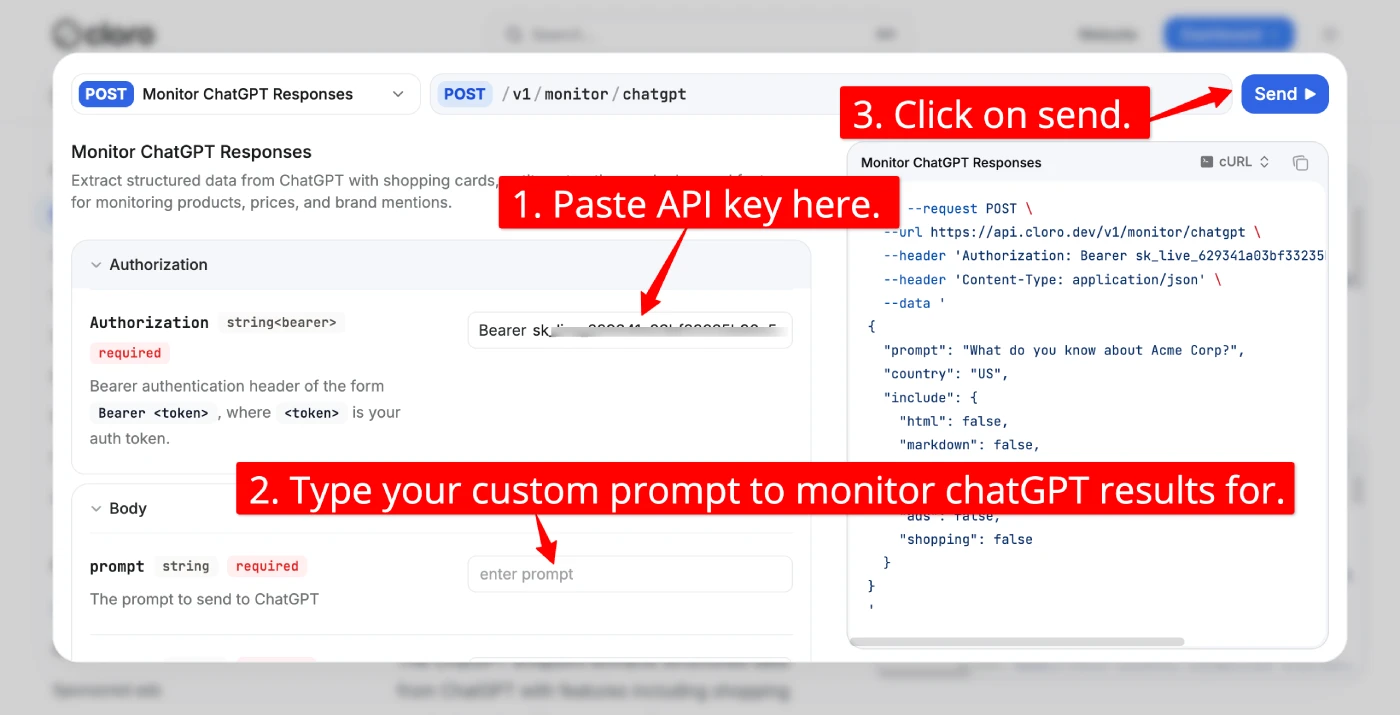
In the playground, find the Authorization field. It expects a Bearer token. Paste your key in this format:
Bearer YOUR_API_KEY
Replace YOUR_API_KEY with the key you just copied from the dashboard. This is how every API request to Cloro authenticates.
Write Your Prompt
In the request body, find the prompt field. Type the query you want to send to ChatGPT. Some good starting examples:
"What are the best project management tools in 2026?"— to see which tools ChatGPT recommends"What do you know about [Your Brand Name]?"— to check if and how ChatGPT describes your company"Best proxy providers for web scraping"— if you're in that space, to see who appears in the answer
You can also enable optional fields:
- Set
include.markdowntotrueto get the response formatted as Markdown - Set
include.searchQueriestotrueto see the internal sub-queries ChatGPT generated from your prompt
The country field accepts ISO country codes (e.g., "US", "GB", "IN"). This affects which localized version of ChatGPT responds.
Send the Request and Wait
Hit Send (or Run, depending on the playground UI). Then wait.
This is not an instant API call. Cloro runs your prompt through ChatGPT in a real browser environment — loading the page, running the query, waiting for the full response. Expect 10 to 30 seconds for a response. That is normal.
Read the Results
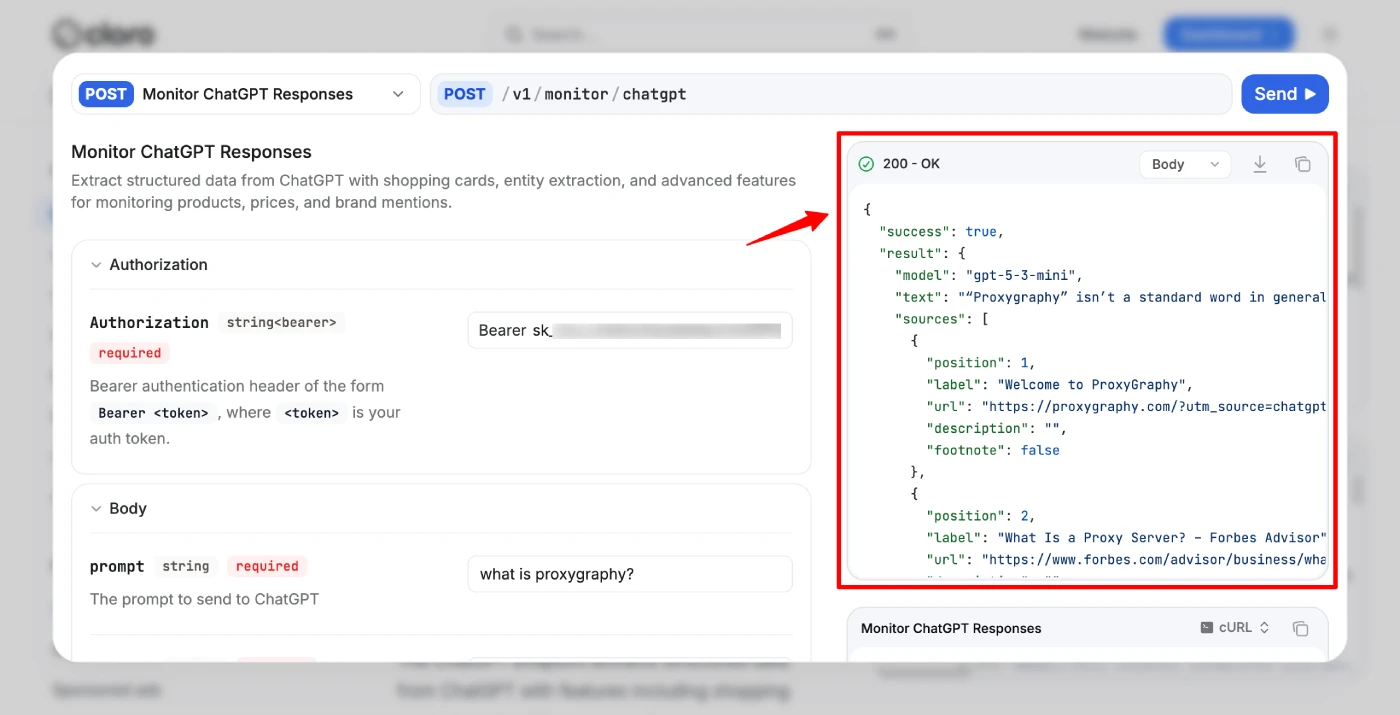
Once the response comes back, you'll see a JSON payload with:
result.text— the full text of ChatGPT's answerresult.sources— an array of sources ChatGPT cited, each with a URL, title, description, and publication dateresult.searchQueries— the sub-queries ChatGPT internally generated from your prompt (only if you enabled it)result.model— which GPT model answered the query (e.g.,"gpt-5")
The response also includes an X-Request-Id header. Copy it if something looks wrong — Cloro support uses it to debug individual requests.
That was the quick workflow to test the API. What you just did manually — typing a prompt and seeing ChatGPT's response with citations — is exactly what your code will automate at scale.
The Full API Reference
Endpoint
POST https://api.cloro.dev/v1/monitor/chatgpt
All requests require an Authorization: Bearer YOUR_API_KEY header and a Content-Type: application/json header.
Request Parameters
| Parameter | Type | Required | Description |
|---|---|---|---|
prompt | string | Yes | The query to send to ChatGPT (1–10,000 characters) |
country | string | No | ISO 3166-1 alpha-2 country code — defaults to "US" |
include.html | boolean | No | Returns a 24-hour CDN URL to the full HTML of the response |
include.markdown | boolean | No | Returns the response formatted as Markdown |
include.rawResponse | boolean | No | Returns the raw token stream from ChatGPT |
include.searchQueries | boolean | No | Returns the internal sub-queries ChatGPT generated from your prompt |
include.ads | boolean | No | Include ad results in the response |
include.shopping | boolean | No | Include shopping card / product results |
All include.* fields default to false — only enable what you actually need.
Response Fields
| Field | Description |
|---|---|
success | Always true on a successful response |
result.text | ChatGPT's full answer as plain text |
result.sources | Array of cited sources: {position, url, label, description, footnote, datePublished} |
result.html | CDN URL to full HTML — expires after 24 hours (requires include.html: true) |
result.markdown | Markdown-formatted response (requires include.markdown: true) |
result.rawResponse | Raw token-by-token stream (requires include.rawResponse: true) |
result.searchQueries | Array of internal sub-queries ChatGPT ran (requires include.searchQueries: true) |
result.model | GPT model that handled the request (e.g., "gpt-5") |
result.shoppingCards | Shopping product recommendations (requires include.shopping: true) |
result.inlineProducts | Inline product results embedded in the response |
Code Examples
cURL
curl --request POST \
  --url https://api.cloro.dev/v1/monitor/chatgpt \
  --header 'Authorization: Bearer YOUR_API_KEY' \
  --header 'Content-Type: application/json' \
  --data '{
    "prompt": "What do you know about Acme Corp?",
    "country": "US",
    "include": {
      "markdown": true,
      "searchQueries": true
    }
  }'
Python
import requests

response = requests.post(
    "https://api.cloro.dev/v1/monitor/chatgpt",
    headers={
        "Authorization": "Bearer YOUR_API_KEY",
        "Content-Type": "application/json"
    },
    json={
        "prompt": "What do you know about Acme Corp?",
        "country": "US",
        "include": {"markdown": True, "searchQueries": True}
    }
)

result = response.json()
print(result['result']['text'])
print(result['result']['sources'])
JavaScript
const response = await fetch("https://api.cloro.dev/v1/monitor/chatgpt", {
  method: "POST",
  headers: {
    Authorization: "Bearer YOUR_API_KEY",
    "Content-Type": "application/json",
  },
  body: JSON.stringify({
    prompt: "What do you know about Acme Corp?",
    country: "US",
    include: { markdown: true, searchQueries: true },
  }),
});

const data = await response.json();
console.log(data.result.text);
console.log(data.result.sources);
Example Response
{
  "success": true,
  "result": {
    "text": "Acme Corp is a fictional corporation that appears in many cartoons...",
    "sources": [
      {
        "position": 1,
        "url": "https://example.com/article",
        "label": "Article Title",
        "description": "A short description of the source...",
        "footnote": false,
        "datePublished": "May 22, 2025"
      }
    ],
    "searchQueries": [
      "What is Acme Corporation?",
      "Acme Corp company overview"
    ],
    "model": "gpt-5"
  }
}
Error Codes
If something goes wrong, the API returns a standard HTTP error code. Here is what each one means:
| Code | Meaning |
|---|---|
| 400 | Bad request — check your request body for missing or malformed fields |
| 401 | Unauthorized — your API key is missing or invalid |
| 403 | Forbidden — your account doesn't have access to this resource |
| 429 | Rate limited — you've exceeded your plan's concurrency or request limit |
| 500 | Server error — something went wrong on Cloro's side |
| 502 | Bad gateway — the upstream provider (ChatGPT) had an issue |
For 429 errors, add a retry with exponential backoff in your code. For 500 or 502, wait a few seconds and retry once — these are usually transient.
Always save the X-Request-Id response header when running requests in production code. You'll need it if you contact support about a specific failed request.
Real-World Use Cases
Building AI SEO Monitoring Tools
The core use of this API is not running manual queries in the playground — it is integrating it into automated SEO tooling.
SEO agencies build dashboards that run hundreds of queries daily. For each client, they maintain a list of target keywords relevant to that client's industry. The pipeline works like this: send each keyword as a prompt, parse the sources array from every response, check whether the client's domain appears in those citations, and log the position and context over time.
The sources field is the key data point here. It tells you exactly which websites ChatGPT is citing for a given query — the same way a traditional SERP tells you which pages rank on Google.
The searchQueries field adds another layer. It shows the internal sub-queries ChatGPT generated from your original prompt — a process sometimes called "query fan-out." This is useful for discovering keyword variations you hadn't thought of, because it reveals how ChatGPT interprets and expands a topic before answering.
In-House AI SEO Monitoring for Mid-to-Large Businesses
Mid-to-large businesses are increasingly building their own AI visibility monitoring systems rather than relying entirely on third-party tools. The Cloro API makes this practical.
A typical setup is a scheduled job — run daily or weekly — that sends a set of core brand and category keywords through the API and logs the results to an internal database. The business then tracks: Is our brand mentioned in the response text? Does our domain appear in the cited sources? How has this changed week over week?
This gives businesses a direct signal of their AI search visibility — a metric that is becoming as important as traditional search rankings as more users get answers from ChatGPT rather than clicking through to a search results page.
Companies building in-house also get full control over the data. They can combine AI visibility signals with internal metrics like revenue, ad spend, and content performance. They can build custom alerts when a competitor's brand starts appearing in answers for their target queries, or when their own brand drops out of the citations entirely.
If you're evaluating whether Cloro is the right tool for this kind of setup, the Cloro.dev full review covers pricing, plan limits, and how it compares to building your own scraper.
FAQs
How long does each API request take?
Each request typically takes 10 to 30 seconds. Cloro runs your prompt in a real browser environment to get the same response a human user would see — including web search results and citations. This takes longer than a simple HTTP call but returns much richer data.
Do I need a credit card to sign up?
No. You can create a free account at https://dashboard.cloro.dev/sign-up and get 500 free credits without entering any payment information. You only need to add a payment method when you upgrade to a paid plan.
What does include.searchQueries actually return?
It returns the internal sub-queries that ChatGPT generated from your original prompt before answering. For example, if your prompt is "best CRM tools for small businesses," ChatGPT might internally run queries like "top CRM software 2026" and "CRM for small teams comparison." These sub-queries are the query fan-out, and they reveal how ChatGPT interprets your topic — useful for expanding your keyword list.
What is the X-Request-Id header for?
Every API response includes an X-Request-Id header with a unique identifier for that specific request. If a request fails or returns unexpected data, include this ID when contacting Cloro support — it lets them look up the exact request in their logs.
Can I run requests for multiple countries?
Yes. The country parameter accepts any ISO 3166-1 alpha-2 country code (e.g., "US", "GB", "DE", "IN"). Responses may differ by country because ChatGPT can surface different sources and answers based on region.
What happens if I hit the rate limit (429)?
A 429 error means you have exceeded your plan's concurrency or request rate. Implement exponential backoff in your code — wait 2 seconds, retry; if it fails again, wait 4 seconds, and so on. If you're consistently hitting 429, you may need to upgrade your plan or reduce concurrency.
Start Using the Cloro.dev ChatGPT Monitor API Today
The Cloro.dev ChatGPT Monitor API is straightforward to integrate once you understand the response structure. The most valuable fields for SEO use cases are result.sources (which URLs ChatGPT cited) and result.searchQueries (how ChatGPT expanded your prompt internally). Everything else — the text, HTML, markdown, raw stream — depends on what your specific tool or workflow needs.
Start with the free tier, run a few prompts against your brand name and top keywords, and look at the sources array. That data alone will tell you whether your site has any AI search visibility for those queries.