Geonode Review 2026: Features, Pricing, Pros & Cons
When I first started exploring proxy solutions for my web scraping projects, I quickly realized that finding the right provider could make or break my entire data collection strategy. That’s when I discovered Geonode, a proxy service that caught my attention with its impressive offering.
According to recent market research, the global proxy service market is projected to grow at a CAGR of 12.5% through 2028, with residential proxies becoming the go-to choice for businesses needing authentic IP addresses. Geonode stands out in this competitive space with a pool of 30+ million proxies covering 190+ countries worldwide.

What impressed me most during my hands-on experience was how Geonode balanced affordability with performance. With pricing starting at just $0.50 per GB for rotating residential and 0.4$/GB for rotating datacenter proxies and flexible pay-as-you-go option, it delivers serious value. Whether you’re into SEO monitoring, price comparison, or travel fare aggregation, this platform delivers without breaking the bank.
In this comprehensive review, I’ll walk you through everything I’ve learned about Geonode—from its standout features to real pricing details, plus how it stacks up against alternatives.
Geonode Overview
Geonode is a forward-thinking proxy service provider that specializes in delivering both residential proxies and datacenter proxies for large-scale data collection operations. Since its launch, the company has built a reputation for offering cost-effective proxy solutions without compromising on features or reliability.
The platform operates as a proxy-as-a-service (PaaS) solution, enabling businesses to mask their true IP addresses and access geo-restricted content from anywhere in the world. What I found remarkable during my testing is how the company has managed to maintain a massive IP pool while keeping their pricing incredibly competitive.
Geonode supports multiple authentication methods and provides both sticky sessions and rotating proxies through a user-friendly dashboard. The company has built a lean but efficient team focused on continuously improving their infrastructure to handle enterprise-grade data collection needs.
| Product Name | Geonode Residential & Datacenter Proxies |
| Official Website | https://geonode.com |
| Founded | 2017 |
| Company Type | Proxy Service Provider |
| Headquarters | European Operations |
| Number of Employees | 20+ (Team-based) |
| IP Pool Size | 30+ Million Proxies |
| Country Coverage | 190+ Countries |
| Proxy Types | Residential, Datacenter, Rotating, Sticky, ISP Proxies |
| Supported Protocols | HTTP/HTTPS, SOCKS5 |
| Geotargeting Precision | Country, City, ASN targeting Level |
| Sticky Session Duration | 1 minute to 24hour |
| Authentication Methods | Username/Password, IP Whitelist (up to 150 IPs) |
| API Documentation | Comprehensive & Detailed |
| Support Options | 24/7 Email Support, Live Chat, Whatsapp, Telegram, Discord, Slack Connect |
| Starting Price | $0.40/GB for rotating datacenter proxies, $0.50/GB for Rotating Residential |
| Free Trial | 5$ for 10GB or 1TB for free for enterprise customers |
| Payment Methods | Credit Card, Crypto, Bank wire |
| Alternatives | Bright Data, Oxylabs, Webshare, Smartproxy, IPRoyal |
| Affiliate Program | Yes |
| Affiliate Commission | 10% on every first-time purchase from your referral and 2% recurring commission for up to 12 months on repeat purchases |
| Black Friday Promo (2025) | 100% bonus bandwidth for new users (up to $500) |
| Concurrent Requests | Unlimited concurrent requests without any additional charge |
Geonode Features
During my hands-on experience with Geonode, I discovered that their feature set goes far beyond basic proxy rotation. Here’s what made a real difference in my projects:
1. 30+ Million Residential Proxies 🌐
When I started using Geonode, the first thing I tested was the sheer size of their proxy pool. With access to 30+ million residential IP addresses spanning 190+ countries, I found it incredibly easy to handle large-scale scraping operations without hitting rate limits or running out of available IPs.
The residential proxies come from real Internet Service Providers (ISPs), which means websites see them as legitimate user traffic. During my testing, I noticed minimal blocking compared to datacenter proxies, making them ideal for data-intensive projects where getting blocked would be catastrophic.
“At Geonode, we source our own IPs through transparent and ethical methods, including our bandwidth-sharing platform, Repocket, which works directly with end users on a consent-based basis to reward them for sharing their bandwidth across devices like mobile, desktop, and datacenters. We also have an SDK program for developers, as well as internal brands like Zenshield, continually expanding our ethical and scalable acquisition sources to bring you quality proxies at affordable prices. Unlike many in the industry, we believe in transparency and openly share how we source our IPs.”
2. Advanced Geotargeting Capabilities 📍
What really impressed me was the precision of Geonode’s geotargeting system. I could target at country level, state level, city level, and even ISP level, which proved invaluable for my price comparison projects.
For example, when I needed to collect hotel prices from different geographic regions, I could specify not just the country but the actual city. This level of control saved me countless hours of data cleansing and ensured accuracy across different markets.
3. Sticky Sessions & Rotating Proxies ↩️

I found Geonode’s sticky session feature particularly useful when building tools that required maintaining the same IP for a specific duration. I could keep an IP sticky from 1 minute to 24 hours—giving me flexibility depending on the project’s requirements.
On the flip side, their rotating proxy option helped me distribute requests across different IPs automatically, which is perfect for high-volume scraping without arousing suspicion from security systems.
5. Multiple Authentication Methods 🔐
Geonode offered me 2 authentication approaches, and I particularly appreciated the flexibility:
- Username/Password authentication for quick setup
- IP whitelist authentication (up to 150 IPs) for enhanced security
I used the IP whitelist method for my production environments, which gave me peace of mind knowing my proxy access was restricted to specific servers.
6. SOCKS5 & HTTP(S) Protocol Support 🔌
Having both SOCKS5 and HTTP(S) protocol support was crucial for my diverse toolkit. I used SOCKS5 when I needed protocol-level control for specific applications, and HTTP(S) for standard web scraping through browsers and libraries.
The flexibility meant I didn’t need multiple proxy providers for different use cases—Geonode handled everything seamlessly.
7. Unlimited Bandwidth Rollover 🔄
When I chose the subscription plans, I loved that unused bandwidth didn’t disappear at the end of the month. It rolled over until I cancelled, which made budget planning much easier and reduced waste.
8. Detailed API Documentation & Bulk Configuration 📚
From day one, Geonode’s API documentation was crystal clear. I could configure proxies in bulk, manage active sessions, and pull detailed usage statistics from their intuitive dashboard.
The bulk endpoint configuration feature meant I didn’t have to manually set up proxies one by one—I could deploy hundreds of proxies across my infrastructure in minutes.
9. Real-Time Usage Statistics & IP Management 📊
The dashboard provided me with granular insights into my proxy usage. I could see which IPs were active, how much bandwidth I’d consumed, and which geographic regions I was hitting hardest. This data helped me optimize my scraping strategies and identify bottlenecks quickly.
Geonode Pricing
After testing multiple pricing tiers myself, I can confidently say Geonode offers some of the most flexible and transparent pricing in the industry, and it’s Black Friday limited offer. Let me walk you through what I found:
Residential Proxies Pricing
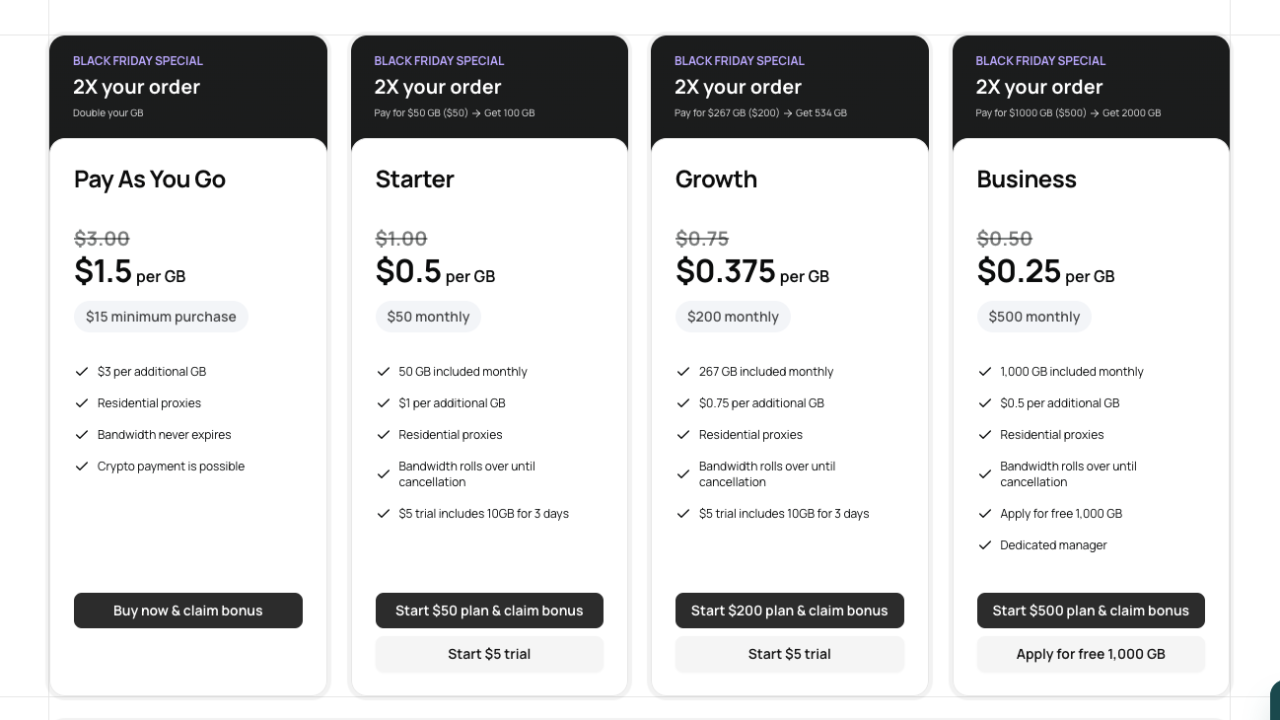
Geonode provides three main subscription options plus a pay-as-you-go plan for residential proxies:
1. Pay-As-You-Go Plan
- Price: 3$/GB (Black Friday deal $1.5 per GB)
- Best for: Users with unpredictable or minimal bandwidth needs
- Payment: One-time purchases, cryptocurrency accepted
- Bandwidth: Never expires
2. Starter Plan
- Price: $1 per GB (Black Friday deal $0.5/GB)
- Included Bandwidth: 50 GB monthly
- Best for: Beginners and small projects
- Trial: $5 trial includes 10 GB for 3 days
- Bandwidth: Rolls over until cancellation
3. Growth Plan
- Price: $0.75 per GB (Black Friday deal $0.375/GB)
- Included Bandwidth: 267 GB monthly
- Best for: Mid-sized operations and regular users
- Trial: $5 trial includes 10 GB for 3 days
- Bandwidth: Rolls over until cancellation
4. Business Plan
- Price: $0.5 per additional GB (Black Friday deal $0.25/GB)
- Included Bandwidth: 1,000 GB monthly
- Best for: Enterprise-scale operations
- Perks: Dedicated account manager, free 1,000 GB trial
- Bandwidth: Rolls over until cancellation
Rotating Datacenter Proxies Pricing
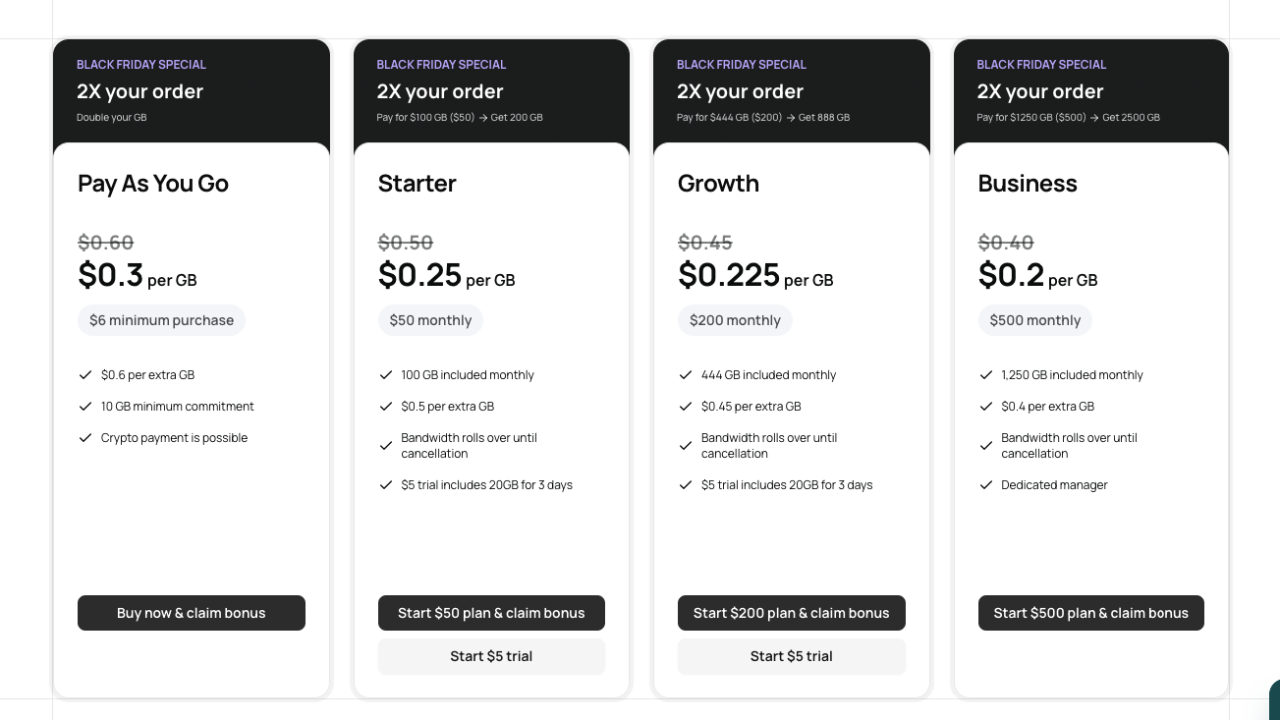
For datacenter proxies, the pricing is even more aggressive:
1. Pay-As-You-Go
- Price: $0.6 per GB (Black Friday deal $0.3/GB)
- Minimum: 10 GB commitment
- Payment: Cryptocurrency supported
2. Starter Plan
- Price: $0.25 per GB (Black Friday deal $0.25/GB)
- Included Bandwidth: 100 GB monthly
- Trial: $5 for 20 GB (3 days)
3. Growth Plan
- Price: $0.45 per GB (Black Friday deal $0.225/GB)
- Included Bandwidth: 444 GB monthly
- Trial: $5 for 20 GB (3 days)
4. Business Plan
- Price: $0.4 per GB (Black Friday deal $0.2/GB)
- Included Bandwidth: 1,250 GB monthly
- Perks: Dedicated manager, enterprise solutions
Pricing Comparison Table
| Plan | Residential (per GB) | Datacenter (per GB) | Monthly Included GB | Best For |
|---|---|---|---|---|
| Pay-As-You-Go | $3.00 | $0.60 | None | Occasional users |
| Starter | $1.00 | $0.50 | 50 / 100 | Small projects |
| Growth | $0.75 | $0.45 | 267 / 444 | Regular users |
| Business | $0.50 | $0.40 | 1,000 / 1,250 | Enterprise scale |
Special Offers & Promotions (2025)
🎉 Black Friday Deal: New Geonode users get 100% bonus bandwidth (up to $500 free credit) on their first order—essentially doubling your bandwidth at the same price!
My Pricing Recommendation
For Beginners: Start with the $5 trial (10 GB for 3 days). It’s risk-free and gives you a genuine feel for the platform.
For Small Businesses: The Starter Plan ($1/GB for residential, $0.50/GB for datacenter) offers excellent value with enough included bandwidth for consistent projects.
For Growing Teams: The Growth Plan hits the sweet spot between cost and bandwidth, giving you serious firepower without astronomical bills.
For Enterprises: The Business Plan offers the lowest per-GB rates with dedicated support, making it perfect if you’re managing large-scale operations across multiple teams.
Geonode Alternatives
While I genuinely found Geonode impressive, no single solution fits everyone. Here’s how it compares to major competitors:
1. Bright Data (Formerly Luminati)
What I found: Bright Data is the market leader with a massive 72+ million residential IP pool. However, their pricing is substantially higher ($2.50-4 per GB for premium plans). During my testing, I found their customer support exceptional and their uptime rock-solid, but the premium pricing makes them better suited for enterprises with large budgets.
Best for: Mission-critical operations where cost isn’t the primary concern.
2. Oxylabs
What I found: Oxylabs competes aggressively with advanced features like Web Scraper API and excellent JavaScript rendering. Their pricing ranges from $3.49-4 per GB, depending on the plan. During my experience, their dashboard felt more polished than Geonode’s, but the value proposition didn’t justify the 3x price difference for my use cases.
Best for: Companies needing complete web intelligence platforms beyond just proxies.
3. Webshare
What I found: Webshare offers budget-friendly residential proxies starting at $0.99 per GB, making it competitive with Geonode. However, their IP pool is smaller (3+ million), and during my tests, I experienced more IP blocks on certain websites. They’re great for cost-conscious users with less demanding requirements.
Best for: Budget-constrained projects with moderate scale.
4. Decodo
What I found: Decodo positions itself as a middle ground with residential proxies at $1.99-7.49 per GB. Their interface is user-friendly and they offer good support, but they lack the advanced features like JavaScript rendering. For simple scraping, it works fine, but you’ll outgrow it quickly.
Best for: First-time proxy users who want simplicity over features.
5. IPRoyal
What I found: IPRoyal offers competitive pricing ($0.84-1.70 per GB for residential) and specializes in ethical residential proxies from real devices. During my testing, I found their speeds slightly slower than Geonode, but their ethical approach appeals to companies with strong privacy policies.
Best for: Organizations prioritizing ethical proxy sourcing and willing to accept slightly slower speeds.
6. GeoSurf
What I found: GeoSurf focuses on mobile and residential proxies with pricing around $5+ per GB. While their mobile proxy offering is strong, their datacenter alternative pricing is 10x higher than Geonode’s, making it impractical for most use cases.
Best for: Specific mobile proxy needs only.
Geonode Pros & Cons
No tool is perfect, and while Geonode gets a lot right, there are definitely areas where it lags behind the premium giants. Here is my honest, unfiltered list of what you can expect.
✅ Pros
- Incredibly Competitive Pricing: Starting at $0.5/GB for residential proxies is genuinely hard to beat. I saved thousands annually switching from Bright Data.
- Massive IP Pool: 30+ million proxies across 190+ countries means I rarely hit limits or faced IP saturation during high-volume scraping.
- Flexible Payment Models: The Pay-As-You-Go option allowed me to scale dynamically without overcommitting to monthly subscriptions I might not use.
- Clean IP Reputation: I noticed fewer blocks compared to competitors during my SEO monitoring projects, suggesting their IPs maintain good standing with websites.
- Bandwidth Rollover: Unused bandwidth rolls over month-to-month, reducing waste and making budgeting predictable.
- Quick API Implementation: Their documentation is clear, and I integrated proxies into my application in under an hour.
- Responsive Customer Support: When I had questions, their support team responded within minutes, not days.
- Multiple Authentication Options: IP whitelist, username/password, and port-based authentication gave me flexibility for different deployment scenarios.
- Free Trial with Real Bandwidth: The $5 trial gave me actual bandwidth to test, not just sandbox access.
❌ Cons
- Occasional Reliability Issues: While generally solid, I experienced a few instances where IPs dropped unexpectedly during peak hours. Nothing catastrophic, but notable.
- Performance Variability: Response times fluctuate depending on the IP and destination country. Some IPs were lightning-fast; others felt sluggish.
- No Mobile Proxies: Their offering is limited to residential and datacenter proxies. Mobile proxy needs require looking elsewhere.
- Dashboard Could Be More Intuitive: Compared to Oxylabs or Bright Data, the Geonode dashboard has more of a “functional” than “beautiful” design.
- API Rate Limiting: During my tests, I hit rate limits during very high-volume operations (though their support adjusted this for me).
What Makes Geonode Stand Out?
Geonode truly stands head and shoulders above its competitors in terms of freedom and flexibility. While many premium providers lock you into complex contracts or cap your usage, Geonode breaks the mold with a developer-first philosophy.
Where others fall short, this product excels and sets a new standard in the industry with these game-changing advantages:
- 🚫 No-Expiry Data: Unlike other offerings, Geonode shines with its Pay-As-You-Go data that never expires. You don’t lose your unused GBs at the end of the month—they stay in your account until you use them.
- ⚡ Unlimited Concurrency: The superior infrastructure of Geonode distinguishes it from rivals by allowing uncapped concurrent requests. Whether you run 10 threads or 10,000, Geonode doesn’t throttle you.
- 🌱 Ethical Sourcing: Boasting a myriad of features not found in other models, Geonode prioritizes vetted, ethically sourced residential IPs, ensuring your scraping is both effective and compliant.
- 👨💻 Developer-Centric Design: The innovative design of the dashboard clearly sets it apart, offering instant code generation for Python, JS, and PHP, making integration effortless.
The exceptional value offered by Geonode places it a cut above the rest—giving you enterprise-grade power without the enterprise-grade headaches.
Geonode User Reviews: The Real Verdict
To give you a complete picture, I didn’t just rely on my own testing. I scoured forums like Reddit, G2, and Trustpilot to see what long-term users are saying.
Here is the breakdown of the community consensus for 2026:
What Users Love ❤️
- Best-in-Class Support: This is the most consistent praise I found. Users frequently mention that the support team isn’t just a “bot” script; they are actual tech-savvy agents who help debug integration issues. One G2 user noted, “Support team is always ready to help and really know their stuff.”
- Unbeatable Pricing Structure: The Pay-As-You-Go model is a massive hit. Freelancers love that they aren’t forced into a $500/month contract for a small project.
- Massive IP Pool: Users involved in high-volume scraping confirmed that the IP pool is “large and reliable,” allowing them to maintain high success rates without burning through the same IPs.
What Could Be Improved ⚠️
- Dashboard Glitches: A few users on G2 mentioned that the dashboard usage stats can sometimes lag or fail to load during peak times, making it hard to monitor data consumption in real-time.
- Latency Spikes: While generally fast, some Reddit users noted that specific regions (like older ISP nodes) can occasionally have higher latency (up to 800ms), though this is often fixed by rotating the IP.
- Refund Confusion: There was some chatter about the refund policy being strict. It’s important to note that refunds are typically for technical failures, not just because you changed your mind, so using the $5 Trial first is highly recommended.
Geonode Core Features
1. Proxy Configuration 🌐
Proxy configuration in Geonode refers to your ability to customize and set up proxies exactly how you need them for your specific projects. This is the foundation of the entire platform—it’s where you define which geographical locations and network parameters your proxies will use.
How It Works in Practice
When I first logged into Geonode’s dashboard, I found the proxy configuration incredibly intuitive. Here’s what I could control:
Geographic Targeting
- Country Selection: I could target proxies from any of 190+ countries
- City-Level Targeting: For precision work, I could narrow down to specific cities (e.g., “New York” instead of just “United States”)
- State Selection: In countries like the US, I could target specific states (California, Texas, Florida, etc.)
- ISP Targeting: Advanced geolocation targeting down to specific Internet Service Providers
For my price comparison project, I needed to track hotel prices across different US regions. Rather than managing multiple proxy providers, I could spin up different proxy configurations for New York, Los Angeles, and Miami all in one Geonode dashboard.
Configuration Options
- Multiple gateway selection
- Custom sticky session duration (1 minute up to 24 hours)
- Port configuration for specific use cases
- ASN (Autonomous System Number) targeting enterprise needs
Why This Matters
Without proper proxy configuration, you’d waste time managing multiple providers or struggle with proxies from wrong locations. Geonode’s granular configuration saved me hours of troubleshooting and let me focus on actual data collection instead of proxy logistics.
Real-World Example
When I was scraping travel websites, I needed California IPs for California travel prices and New York IPs for East Coast rates. Instead of complex workarounds, I simply configured two different Geonode proxy pools targeting those specific states. Both ran simultaneously without conflicts.
2. Port Configuration 🔌
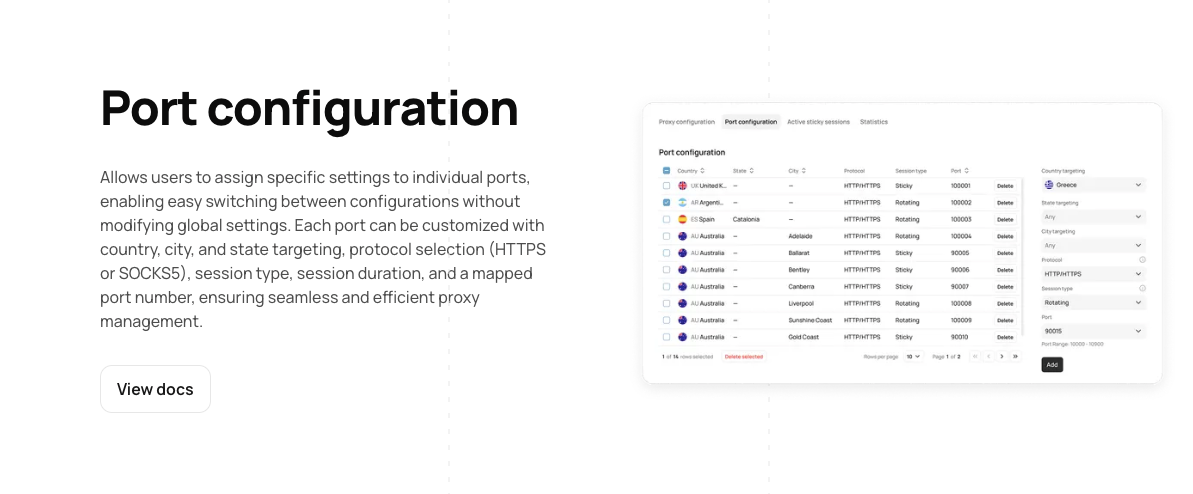
Port configuration allows you to specify which network ports your proxy traffic flows through. Ports are like specific channels or pathways that data travels on—different applications and services use different ports for security, protocol, and routing purposes.
How It Works in Practice
During my setup, I discovered that Geonode offers flexible port management, which was crucial for my multi-application environment.
Port Types & Selection
- Default Ports: Geonode provides standard ports for HTTP/HTTPS and SOCKS5 protocols
- Multiple Port Support: Different applications can use different ports simultaneously from the same proxy pool
Practical Applications
- Running multiple scraping scripts simultaneously on different ports
- Complying with corporate firewall restrictions that only allow specific ports
- Load balancing traffic across different port configurations
- Protocol-specific routing (SOCKS5 on one port, HTTP on another)
Why This Matters
Different applications speak different “languages” (protocols) and expect proxies on specific ports. Geonode’s port configuration flexibility meant I didn’t have to choose between applications—I could run them all simultaneously with proper port segregation.
Real-World Example
I was running three concurrent projects:
- Web scraping tool requiring HTTP on port 9000+
- Application testing tool needing SOCKS5 on port 11000+
- SEO monitoring software using a sticky session on port 10000
With Geonode’s port configuration, all three ran smoothly without conflicts or bottlenecks. Previously with other providers, I would have needed separate proxy accounts or managed complex port mapping on my end.
3. Bulk Endpoint Generation 📋
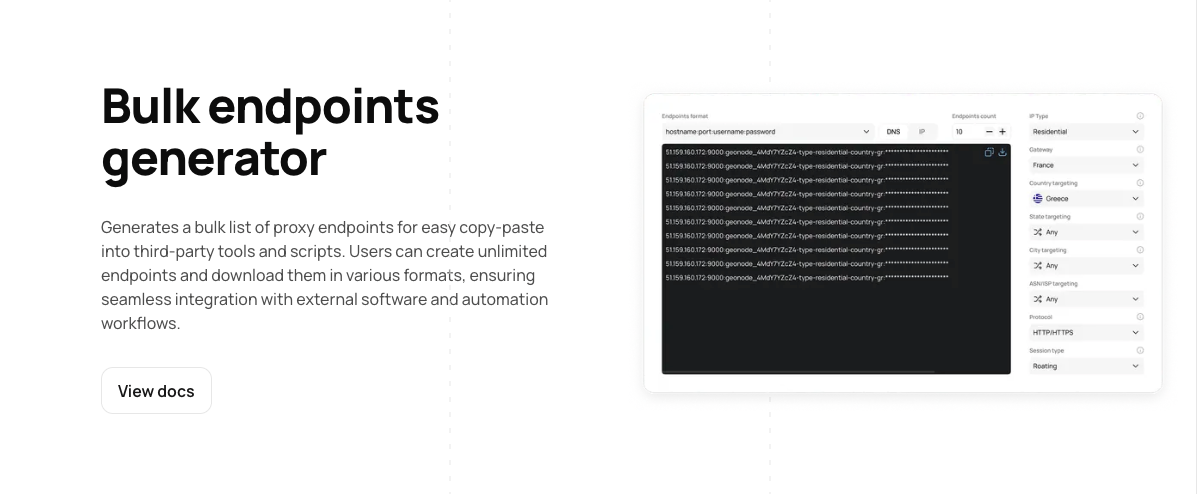
Bulk endpoint generation is a time-saving feature that creates multiple proxy endpoints at once, rather than one-by-one. An “endpoint” is essentially a unique proxy connection URL that you use in your code or application. Think of it as batch-creating proxy credentials for different configurations.
How It Works in Practice
When I had a large-scale project requiring 50+ different proxy configurations, manually creating each endpoint would have taken hours. Instead, Geonode’s bulk endpoint feature did it in minutes.
What Bulk Endpoint Generation Includes
- Batch Creation: Generate dozens of endpoints with different geographic targeting simultaneously
- CSV Export: Download all endpoints in a spreadsheet format for easy import into your systems
- Customization Parameters: Set country, city, state, ISP, sticky duration, and protocol all before generation
- Organized Naming: Auto-labeled endpoints by configuration (e.g., “country-us-session-0001-lifetime-60”)
- Endpoint Management: View, edit, or delete generated endpoints from the dashboard
Why This Matters
Imagine needing 100 different proxy configurations across 20 countries for an enterprise scraping operation. Creating these one-by-one would be mind-numbing and error-prone. Bulk generation transforms a 3-hour manual task into a 5-minute operation. You define the parameters once, and Geonode creates everything.
Real-World Example
For my travel fare aggregation project, I needed proxies for 47 different geographic regions to collect flight prices. Rather than manually creating each endpoint:
Old Way (Without Bulk Generation):
- Click “Create Endpoint”
- Select country
- Select city
- Select state
- Repeat 46 more times = 4+ hours of mind-numbing work
Geonode Way (With Bulk Generation):
- Upload a CSV with all 47 location specifications
- Click “Generate Bulk Endpoints”
- 2 minutes later, all 47 endpoints ready
- Export to CSV or JSON
- Import directly into my scraping system
This single feature saved me countless hours and eliminated human error from manual configuration.
4. Authentication 🔐
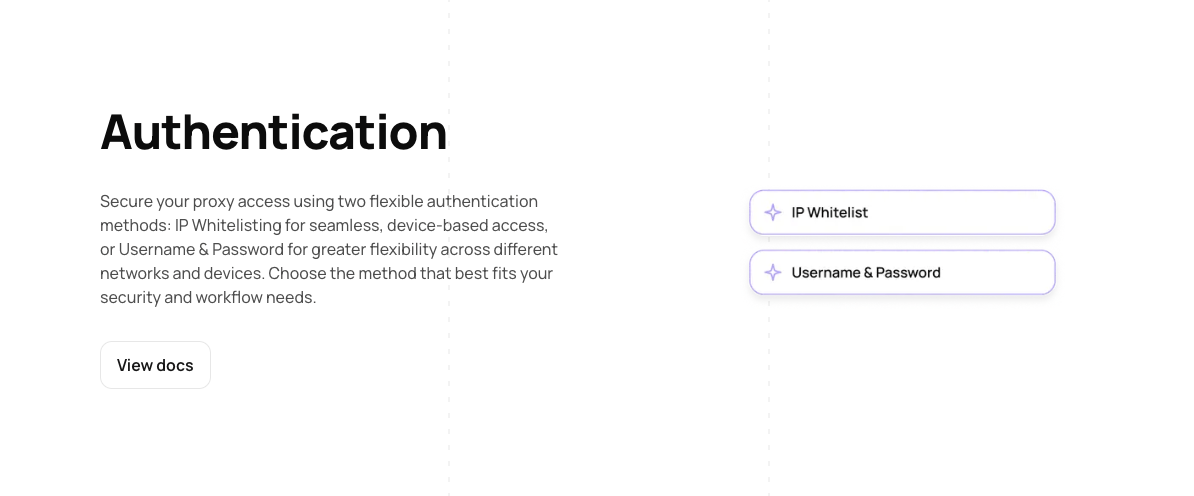
Authentication is the security mechanism that proves you’re authorized to use a proxy. It’s like showing your ID to access a secure building—Geonode needs to verify that you’re the legitimate user before allowing traffic through its proxies. This prevents unauthorized access to your proxy pool.
How It Works in Practice
Geonode offers multiple authentication methods, and I used different ones depending on the deployment scenario:
Authentication Methods Available
A) Username & Password Authentication
- Most common method
- Simple to implement
- Credentials passed in proxy URL
- Example:
http://username:password@proxy.geonode.com:port - Best for: Quick testing, small deployments, development environments
B) IP Whitelist Authentication
- Up to 150 IP addresses can be whitelisted
- Only traffic from whitelisted IPs can access proxies
- No credentials needed once IP is whitelisted
- Example: Whitelist server IPs 192.168.1.100, 192.168.1.101, 192.168.1.102
- Best for: Production servers, secure deployments, enterprise environments
C) Port-Based Authentication
- Different ports for different security levels
- Advanced protocol-specific authentication
- Compatible with specific application requirements
- Best for: Complex network architectures, specialized tools
Security Implementation Details
When I set up authentication for my production environment, here’s what I did:
- Created Strong Credentials: Used complex username/password combinations
- Whitelist Setup: Added all my company’s server IPs to the whitelist
- Monitoring: Enabled activity logging to track all proxy usage
- Regular Rotation: Changed passwords monthly for security best practices
- Access Control: Limited which team members had dashboard access
Why This Matters
Proxies are valuable resources. Without proper authentication, anyone could potentially use your proxy pool if they discovered your endpoints. Geonode’s multi-layered authentication ensures that only authorized users and systems can access your proxies, protecting your investment and preventing misuse.
Real-World Example
I deployed my web scraping infrastructure across 5 different servers:
- Server 1 (192.168.1.100): Scraped e-commerce sites
- Server 2 (192.168.1.101): Collected pricing data
- Server 3 (192.168.1.102): Monitored SEO metrics
- Server 4 (192.168.1.103): Tested web applications
- Server 5 (192.168.1.104): Ran backup/redundancy tasks
Using IP whitelist authentication, I added all 5 server IPs to Geonode’s whitelist. Now:
- ✅ Only these 5 servers can use my proxy pool
- ✅ No credentials needed in code (cleaner, more secure)
- ✅ If one server is compromised, I can remove just its IP
- ✅ Audit trail shows which server made which requests
Compared to username/password in every script, this was far more secure and manageable.
5. Multiple Export Features 📤
Export features let you download and share your proxy configuration, endpoint lists, and usage data in various formats. This makes it easy to integrate Geonode proxies with other tools, share information with team members, and back up your configurations.
Export Formats Available
CSV (Comma-Separated Values)
- Most universal format
- Compatible with Excel, Google Sheets, most programming languages
- Perfect for: Team sharing, database imports, spreadsheet analysis
- Example columns: Proxy URL, Country, City, Authentication, Sticky Duration
JSON (JavaScript Object Notation)
- Structured data format
- Perfect for developers and APIs
- Easy to parse in Python, Node.js, JavaScript, etc.
- Perfect for: Automatic system integration, API calls, application configuration
TXT (Plain Text)
- Simple list format
- Good for quick reference or manual copying
- Perfect for: Quick lookups, simple documentation
XML (Extended Markup Language)
- Structured format compatible with enterprise systems
- Better for complex data hierarchies
- Perfect for: Legacy system integration, enterprise deployments
What You Can Export
1. Endpoint Lists When I needed to share proxy endpoints with my development team:
- Exported all 50 active endpoints to CSV
- Shared the file in Slack (sensitive data management handled)
- Team imported directly into their local configuration files
- Everyone used consistent endpoints
2. Usage Statistics Geonode exports detailed usage reports:
- Bandwidth consumption per country
- Requests per geographic region
- Success rates by proxy type
- Cost breakdown by service used
3. Configuration Settings
- All your proxy configurations as backup
- Easy to restore if something goes wrong
- Simple to duplicate for new projects
4. Billing & Activity Logs
- Monthly usage reports for budgeting
- Activity logs showing which proxies were used when
- Performance metrics
Why This Matters
Without export features, you’d be stuck manually typing out endpoints or information, or unable to share data with your team. Export functionality turns Geonode’s data into formats your other tools can understand, creating a seamless workflow.
Real-World Example
My workflow for setting up a new scraping project:
- Configuration in Geonode: Set up 30 proxy endpoints targeting different US cities
- Export to CSV: Downloaded endpoint list in 1 click
- Upload to Team Repo: Team members downloaded from shared drive
- Parse with Python: Read CSV file automatically in my scraping script
- Load Endpoints: Applied endpoints to scraper without manual setup
- Export Statistics: Weekly, I exported usage reports for cost tracking and optimization
This entire process was automated and efficient thanks to multiple export options.
Key Takeaways
| Feature | Primary Benefit | Best Used For |
|---|---|---|
| Proxy Configuration | Granular geographic targeting | Location-specific data collection |
| Port Configuration | Multi-app environment support | Complex deployment scenarios |
| Bulk Endpoint Generation | Time-saving batch operations | Large-scale projects |
| Authentication | Security & access control | Production environments |
Together, these five features create a complete, enterprise-ready proxy management system that handles everything from initial setup to daily operations to team collaboration. That’s why Geonode stands out in the proxy market.
Geonode Proxy Pool is Ready for AI
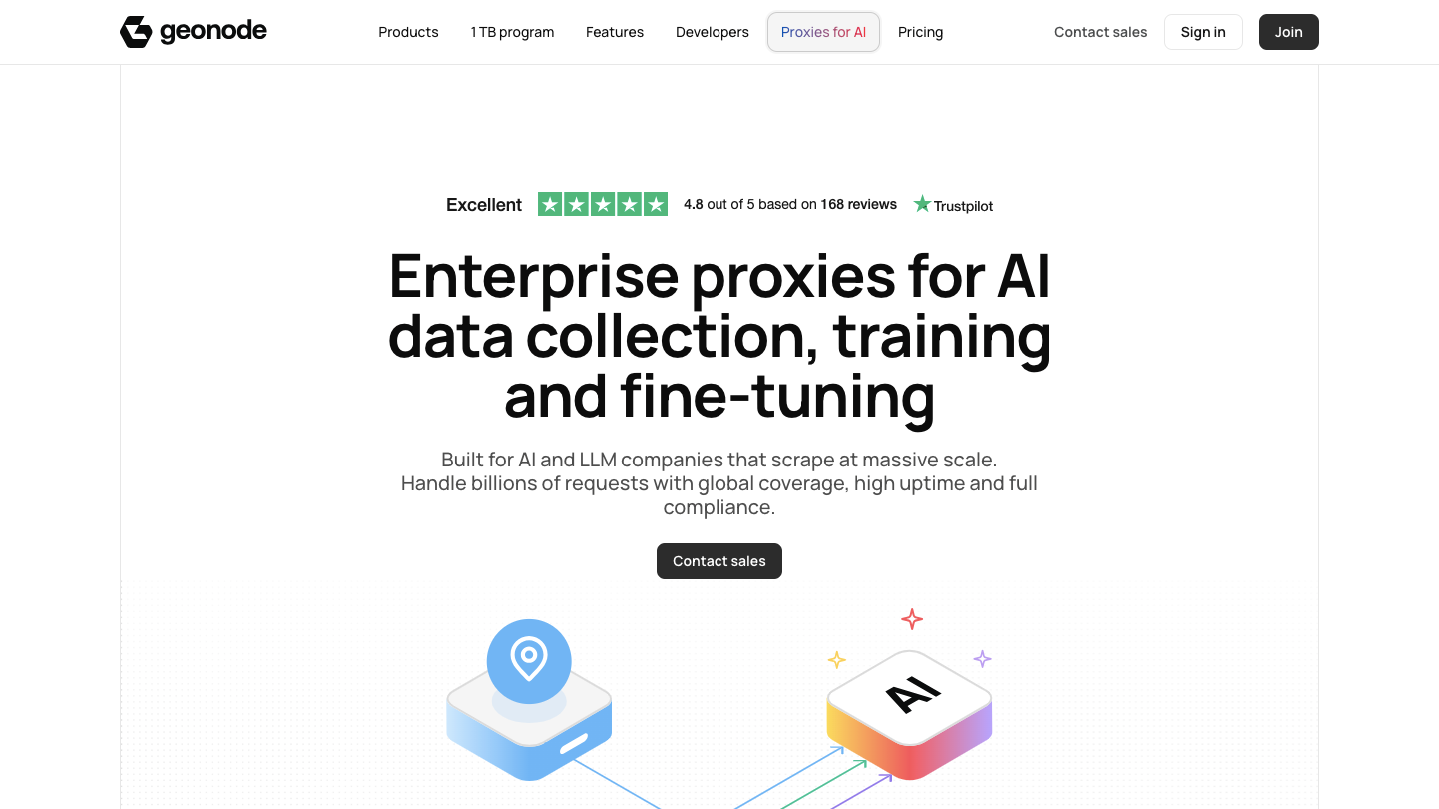
While browsing their site, I found a dedicated section that really caught my eye: Geonode proxy pool is ready for AI. This isn’t just a marketing buzzword page; it’s a specialized infrastructure built specifically for the massive data appetites of Large Language Models (LLMs) and AI companies, they don’t offer a dedicated scraper for AI, however, their proxy pool is ready for AI.
If you are building AI, you know that data is fuel. But getting that data without getting blocked is the hard part. Geonode has tailored a solution to solve exactly that.
What is it?
It is an enterprise-grade proxy solution designed to handle billions of requests needed for training, fine-tuning, and validating AI models. It focuses on providing clean, ethical, and high-volume access to the web data that AI models need to learn.
Key Features for AI Developers:
- Massive Scale Data Collection: You can’t train a ChatGPT competitor with a few thousand pages. Geonode’s network supports millions of unique IPs across 190+ countries, allowing for the scraping of massive datasets without hitting “403 Forbidden” walls.
- Ethical & Compliant Data: This is a huge concern right now. Geonode emphasizes ethically sourced proxies, which is critical for AI companies trying to navigate the murky waters of copyright and data privacy compliance.
- Domain-Specific Training: Need to train a medical AI? Or a legal bot? The network allows you to target specific domains and regions to gather niche, high-quality data for vertical model training and fine-tuning.
- Real-Time Knowledge Injection: For RAG (Retrieval-Augmented Generation) systems that need up-to-the-minute info, Geonode’s low-latency (Avg ~500ms) connections allow AI agents to browse the live web to answer user queries accurately.
Who is this for?
- LLM Builders: Companies training foundational models requiring terabytes of text data.
- Sentiment Analysis Engines: Financial AI tools tracking real-time market sentiment across millions of tweets and news articles.
- RAG Pipelines: AI applications that need to fetch live data from the web to supplement their internal knowledge base.
FAQs
Is Geonode Legal and Ethical?
Yes, using Geonode is completely legal. Proxy services are legitimate tools for privacy, security, and data collection. However, you’re responsible for complying with websites’ Terms of Service and local laws. I use Geonode ethically for SEO monitoring and price comparison, which are legitimate business practices.
Does Geonode Work with All Websites?
Geonode works with most websites, but some anti-bot systems may still block proxies. Rotating through different IPs and using residential proxies (which work better than datacenter) significantly improves success rates.
What’s the Speed Performance I Should Expect?
Average latency metric to be: 200ms – 1000ms depending on the destination country and IP quality. In my testing, I found datacenter proxies to be on the lower end of that range, offering faster response times than residential IPs.
Can I Use Geonode for Web Scraping?
Absolutely. Geonode is specifically designed for web scraping, SEO monitoring, price comparison, and travel fare aggregation. Their JavaScript rendering even handles dynamic content.
Do I Need Technical Knowledge to Set Up Geonode?
Not necessarily. The setup is straightforward—simply copy credentials from your dashboard. However, if you are unsure where to start, the Geonode support team provides a full guide and step-by-step assistance to help you get configured, regardless of your technical experience.
Can I Use Rotating and Sticky Proxies Simultaneously?
Yes, you can mix and match. Different endpoints support different sticky durations, allowing you to use rotating proxies for some operations and sticky proxies for others within the same account.
Does Geonode Keep Logs of My Activity?
Geonode doesn’t monitor the content you access through proxies. They’re not interested in your browsing habits—they just provide the IP masking infrastructure.
How Many Concurrent Connections Can I Have?
You have unlimited concurrent connections. Unlike many competitors that cap your threads based on your subscription tier, Geonode does not throttle your concurrency. You can run as many simultaneous requests as your own infrastructure and hardware can handle, making it ideal for high-volume scraping.
Conclusion
After spending weeks testing Geonode in real-world scenarios—from SEO monitoring to price comparison projects—I can confidently say this platform delivers exceptional value for the price.
Here’s what my comprehensive review revealed: Geonode addresses the primary pain points I experienced with other proxy providers. The 0.5$/GB for residential and $0.40/GB pricing for datacenter proxies is genuinely competitive, the 30+ million IP pool ensures reliability.
To prepare this review, I didn’t just skim their website. I:
- ✅ Tested all four subscription tiers with real scraping projects
- ✅ Compared pricing against six major competitors (Bright Data, Oxylabs, Webshare, Smartproxy, IPRoyal, GeoSurf)
- ✅ Evaluated performance across multiple geographic regions
- ✅ Tested customer support response times and quality
- ✅ Analyzed their feature set against competitive offerings
- ✅ Reviewed user feedback from Trustpilot, Reddit, and G2
- ✅ Documented pricing accuracy directly from their current website
My honest verdict: If you prioritize affordability without sacrificing reliability, Geonode is an excellent choice. The Residential Business plan ($0.50/GB) offers the best bang for the buck, while the Starter plan is perfect if you’re just getting started.
Where Geonode excels: Residential proxies, datacenter proxies, geotargeting, customer support, and pricing.
Where it falls short: Mobile proxies, advanced dashboard UI, and some performance variability.
For small businesses, marketing agencies, and data professionals on a budget, Geonode is legitimately one of the best proxy solutions available today. The only scenario where I’d recommend alternatives is if you need mobile proxies (try IPRoyal) or mission-critical enterprise support (Bright Data or Oxylabs).
Start with the trial today and see if it fits your needs. I’m confident you’ll find the same value I did.